- Home
- Food Vacuum Sealers - Part 1
- Food Vacuum Sealers - Part 2

FoodSaver V2240 Vacuum Sealer Instructions (Part 2)

These food vacuum sealer instructions cover Part 2 of using the FoodSaver V2240. If you need the initial setup and bag-making instructions, start with Part 1 here.
In this guide, I’ll show you where to place the open edge of the bag, how to vacuum and seal it, and how I use the machine’s Seal function with Mylar bags.
Vacuum sealing helps protect properly dried food from air and moisture, but it does not make moist or perishable foods shelf-stable. Foods that normally require refrigeration or freezing must still be kept refrigerated or frozen after sealing.
✅ Quick Answer: How do you use a FoodSaver vacuum sealer?
Place the bag’s open edge in the vacuum channel, close and lock the lid, and press Vacuum & Seal. When the sealing light turns off, unlock the lid and remove the bag. For the Mylar bags I use, place the open edge over the sealing strip and press Seal only. Vacuum sealing reduces exposure to air and moisture, but perishable foods must still be refrigerated or frozen.
Whether you’re sealing dried green beans, jerky, or dehydrated soup ingredients, these FoodSaver V2240 instructions will help you avoid common mistakes and create a clean, secure seal.
Step 1: Place the Bag in the Vacuum Channel
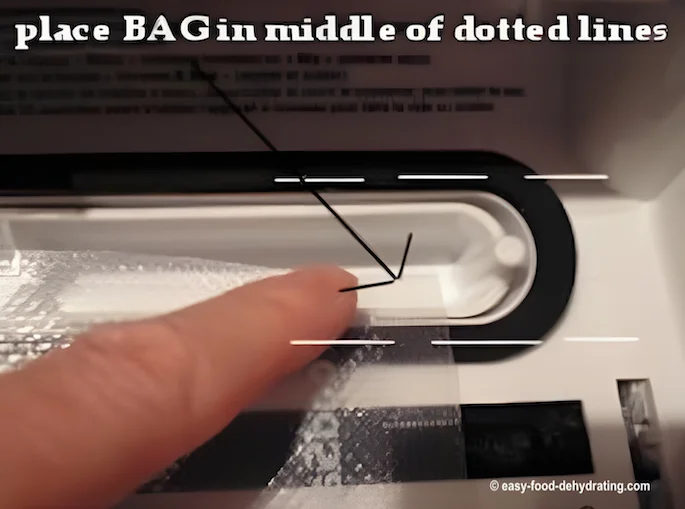
The photo above shows exactly where to place the open, cut edge of your vacuum-sealer bag: directly in the center of the black oval vacuum channel.
Hold the bag flat against the front edge of the machine, keeping your fingertips clear as you close the lid. (It takes a little practice!)
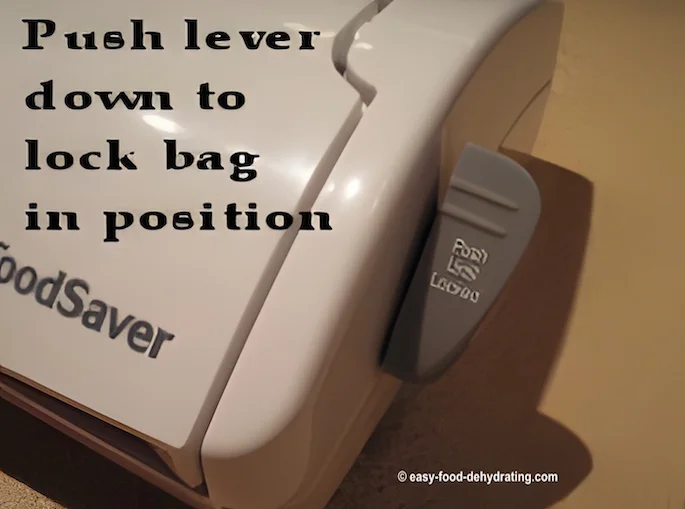
Press down the lever on the right side of the machine to lock the lid and hold the bag in place. The lid must be locked before the FoodSaver can draw the air out of the bag.
Step 2: Smooth the Bag Before Vacuum Sealing
While the bag is clamped, I gently spread the contents into a fairly even layer. Make sure the open end of the bag is clean, dry, and lying flat without wrinkles where the seal will be made.
This small step helps reduce punctures because many foods become brittle and develop sharp edges after drying. Smoothing the contents reduces pressure points against the plastic as the air is removed. I can then place the finished vacuum-sealed bag inside a Mylar bag for additional protection from light and punctures.
Next, press the dark Vacuum & Seal button. The machine will begin drawing out the air. On my FoodSaver V2240, this usually takes approximately 6–10 seconds, depending on the bag and its contents.
Step 3: Let the FoodSaver Finish Sealing
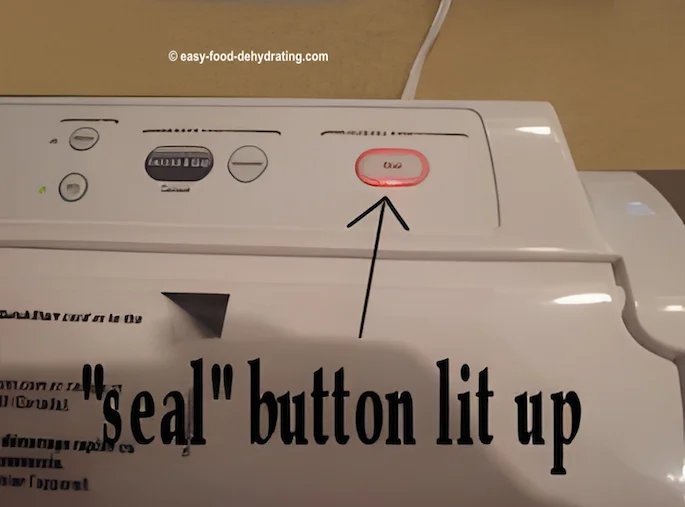
When the vacuuming is finished, the machine automatically switches to Seal mode. The red sealing light will come on, as shown in the photo above.
Let the machine finish sealing before opening the lid. On my FoodSaver V2240, this usually takes approximately six seconds.
When the red light turns off, return the lever to its unlocked position, open the lid, and remove the vacuum-sealed bag. Check that the seal forms a complete, flat line across the bag without gaps or wrinkles.
Important: Use Seal Only for Mylar Bags
When I place an already vacuum-sealed food package inside a Mylar bag, I use the FoodSaver’s Seal function only—not Vacuum & Seal.
Smooth Mylar does not contain the textured air channels that the FoodSaver needs to draw out the air.
How to Heat-Seal Mylar Bags With a FoodSaver
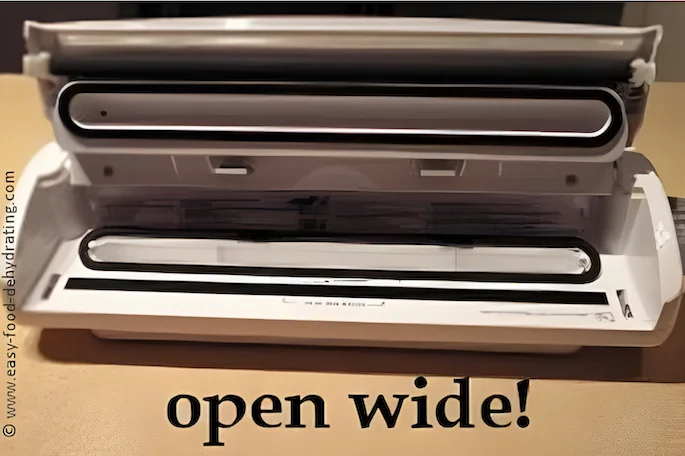
In the open-machine photo above, you can see the dark sealing strip directly in front of the oval vacuum channel. This is where the FoodSaver creates the heat seal.
Lay the open edge of the Mylar bag flat across the sealing strip, allowing approximately one inch of the bag to extend beyond the strip toward the inside of the machine. The edge does not need to sit inside the oval vacuum channel because no air is being removed.
Close and lock the lid, then press Seal rather than Vacuum & Seal. Wait until the sealing light turns off before unlocking the lid and removing the bag.
Check that the seal forms a complete line without gaps or wrinkles. Mylar bags vary in thickness, so test your particular bags before relying on the seal for storage. If the FoodSaver cannot produce a strong, complete seal, use a heat sealer recommended by the bag manufacturer.
I also avoid cutting away unnecessary material from the top of the Mylar bag. Leaving extra room above the contents means I can cut below the old seal and reseal the bag several times.
Pro Tip: Let the Heating Strip Cool Between Seals
Pro Tip:
Let the Heating Strip
Cool Between Seals
When vacuum-sealing plastic bags or heat-sealing Mylar bags, wait at least 20 seconds between sealing cycles to allow the sealing strip to cool.
If the strip is still hot, it may begin sealing the next bag before the machine has finished drawing out the air. A rapidly flashing FoodSaver light means the machine is not ready for another sealing cycle. Wait for it to stop flashing before trying again.
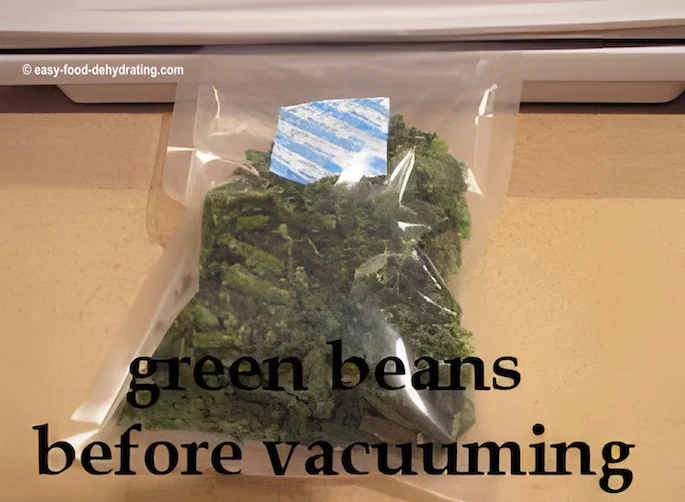
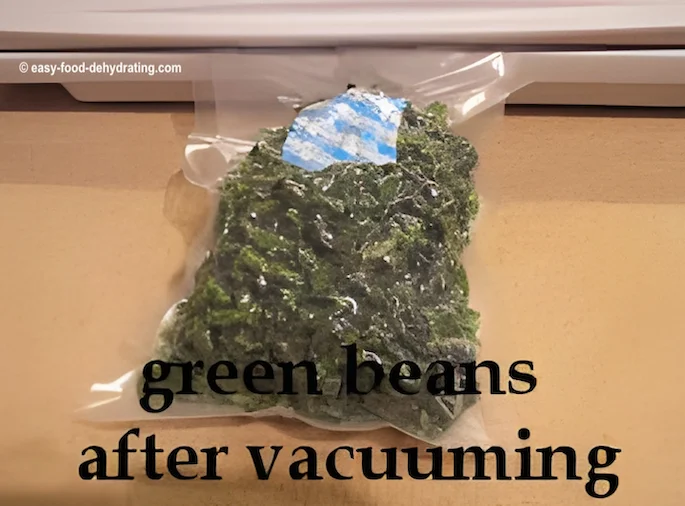
Before and After Vacuum Sealing Dried Green Beans
These photographs show dried green beans before and after vacuum sealing. Notice how the bag tightens around the food as the air is removed.
Label Every Vacuum-Sealed Bag
I use a black permanent marker to write the contents and sealing date at the top of the bag, above the sealed line.
Yes, I know the bags are clear—but once everything is vacuum-packed, green beans can still be mistaken for peas! :-)
Bonus Tip: Double Seal for Extra Peace of Mind
One of our visitors, Paul, shared a practical extra step that I also recommend: create a second seal above the first one.
After vacuum sealing the bag, reposition its open end slightly and press Seal to make a separate second sealing line. This provides a backup if the first seal fails, although it cannot prevent punctures elsewhere in the bag.
Check your stored bags regularly. If a previously tight bag feels soft or loose, inspect it for a failed seal, punctures, or signs of moisture before using the food.
— Thanks for writing in, Paul!
Compare Vacuum Sealers, Bags, and Rolls
The vacuum sealers and supplies below can help protect properly stored food from exposure to air and moisture. Compare the machine features, bag sizes, and roll options to find what works best for the foods you plan to seal.

Bonsenkitchen Vacuum Sealer Machine
The Bonsenkitchen Vacuum Sealer features a handle-locking design and built-in bag cutter. It also comes with two bag rolls and 100 vacuum bags, giving you the basic supplies needed to start vacuum sealing right away.

The FoodSaver 4800 Series combines automatic bag vacuum sealing with a built-in handheld sealer for compatible containers and zipper bags. It also has a removable drip tray for easier cleaning, making it a versatile option for everyday food storage and bulk purchases.

FoodSaver 8" x 20' rolls, 6-pk
These continuous FoodSaver GameSaver rolls let you cut each bag to the length you need. Cut a section from the roll, seal one end, add the food, and then vacuum-seal the open end.
- Each roll measures 8 inches × 20 feet
- Six rolls per package
- BPA-free multilayer material
- Useful for creating custom-length bags

FoodSaver 1-Quart Food Storage Sealer bags
These precut 1-quart FoodSaver bags eliminate the need to measure and cut sections from a roll. Fill the bag while leaving enough empty space at the top, then place the open end in the vacuum channel and seal it.
- Precut 1-quart bags
- 44 bags per package
- BPA-free multilayer material
- Designed for refrigerator and freezer storage
- Convenient for portioning bulk purchases and leftovers

FoodSaver Pint-size Food Storage Sealer bags
These precut pint-size FoodSaver bags are useful when you want to seal smaller portions without wasting a larger bag. Leave enough empty space at the top so the open edge can lie flat inside the vacuum channel.
- Precut 1-pint bags
- 28 bags per package
- BPA-free multilayer material
- Designed for refrigerator and freezer storage
- Convenient for snacks, individual portions, and small amounts of dried food
As an Amazon Associate, I earn from qualifying purchases—this does not affect the price you pay. Read full disclosure.
Frequently Asked Questions About Food Vacuum Sealers
Do I always need to vacuum before sealing?
Do I always need to vacuum before sealing?
No. Use Vacuum & Seal with compatible vacuum-sealer bags when you want the machine to remove air before sealing. Use Seal only when making a bag from a roll, adding a second seal, or heat-sealing a Mylar outer bag. Remember that vacuum sealing does not make foods shelf-stable if they normally require refrigeration or freezing.
Why does my vacuum sealer stop between bags?
Why does my vacuum sealer stop between bags?
The FoodSaver may pause or refuse to begin another cycle when the sealing strip is still too hot. Wait at least 20 seconds between bags and allow additional cooling time if the light is flashing. If it still will not operate, check that the bag is positioned inside the vacuum channel, the lid is fully locked, and the gaskets are clean and properly seated.
Can I reseal vacuum-sealer bags after opening them?
Can I reseal vacuum-sealer bags after opening them?
Yes, provided the bag is still clean, undamaged, and long enough to make another seal. Cut straight across just below the original seal, keep the new open edge clean and dry, and then vacuum-seal it again. Do not reuse bags that held raw meat, raw fish, eggs, or greasy foods.
What kind of marker works best for labeling?
What kind of marker works best for labeling?
A black permanent marker works well on vacuum-sealer bags. Write the food name and sealing date above the sealed line, where the ink will not come into contact with the food.
Thanks for following along with my Food Vacuum Sealer Instructions – Part 2. By keeping the bag opening clean and dry, allowing the sealing strip to cool, and checking every finished seal, you’ll be ready to package your properly dried foods with confidence.
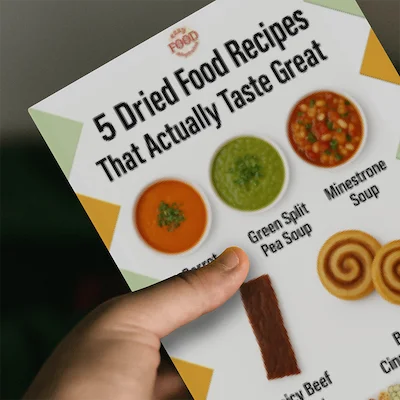
If you’d like more tasty ways to use dried food, don’t miss my free 5 Dried Food Recipes That Actually Taste Great PDF below. Inside you’ll find carrot soup, minestrone, split pea soup, spicy beef jerky, and even banana cinnamon rolls—all proven favorites that make dehydrating fun and delicious!
5 Free Dried Food Recipes
That Actually Taste Great
Put your dried food to delicious use!
Five very different recipes.
Not one dull bite...
5 Free Dried Food Recipes
That Actually Taste Great
Put your dried food to delicious use!
Five very different recipes.
Not one dull bite...
More From Easy Food Dehydrating
Plastic-Lidded Bins for Long-Term Food Storage Choices
Plastic-lidded bins keep dehydrated foods protected. Get airtight, sizing, and setup tips for long-term storage.
Feed Buckets With Lids: Safe Long-Term Food Storage
Food-grade feed buckets with lids keep dehydrated foods safe—airtight, pest-free, and stackable for long-term storage.
Food Vacuum Sealer Bags: Best Picks for Dehydrated Food
How to choose the best food vacuum sealer bags for dehydrated food—thickness, texture, sealing tips, and FAQs included!
Use Mason Jars for Storing Dehydrated Food Long Term
Airtight, reusable Mason jars keep dehydrated foods fresh & visible—perfect for quick daily use and long-term storage.
Dehydrated Food Storage Wall: Easy DIY Pantry Hub
Build a dehydrated food storage wall with DIY tips, cost-saving ideas, and photos to inspire your pantry plan.
Nesco Food Dehydrators: Long-Term Review and Buying Guide
Read my long-term Nesco food dehydrator review covering models, airflow, expandable trays, accessories, and ease of use.


More From Easy Food Dehydrating
Plastic-Lidded Bins for Long-Term Food Storage Choices
Plastic-lidded bins keep dehydrated foods protected. Get airtight, sizing, and setup tips for long-term storage.
Feed Buckets With Lids: Safe Long-Term Food Storage
Food-grade feed buckets with lids keep dehydrated foods safe—airtight, pest-free, and stackable for long-term storage.
Food Vacuum Sealer Bags: Best Picks for Dehydrated Food
How to choose the best food vacuum sealer bags for dehydrated food—thickness, texture, sealing tips, and FAQs included!
Use Mason Jars for Storing Dehydrated Food Long Term
Airtight, reusable Mason jars keep dehydrated foods fresh & visible—perfect for quick daily use and long-term storage.
Dehydrated Food Storage Wall: Easy DIY Pantry Hub
Build a dehydrated food storage wall with DIY tips, cost-saving ideas, and photos to inspire your pantry plan.
Nesco Food Dehydrators: Long-Term Review and Buying Guide
Read my long-term Nesco food dehydrator review covering models, airflow, expandable trays, accessories, and ease of use.
Before You Go...
If you enjoyed this page, tap the ❤️ in the lower right-hand corner. It saves this page to your Grow bookmarks so you can find it again later.
You’ll also see quick share buttons to copy the link, post to Facebook, or save it straight to Pinterest.

Test Your Food-Dehydrating
Know-How
Choose a food, make the right preparation, drying, and storage decisions—and see how many stars you can earn!
Play “Save the Harvest”Test Your Food-Dehydrating
Know-How
Choose a food, make the right preparation, drying, and storage decisions—and see how many stars you can earn!
What We Mean by “Dehydrate”
Here at Easy Food Dehydrating, “dehydrate” always means using an electric food dehydrator — the easy, reliable way to dry food at home.
What We Mean by “Dehydrate”
Here at Easy Food Dehydrating, “dehydrate” always means using an electric food dehydrator — the easy, reliable way to dry food at home.


LATEST READS on EFD


-
How to Dehydrate Citrus Slices: Lemons, Limes & Oranges
Sep 19, 26 03:28 PM
 Learn how to dehydrate citrus slices at 135°F. Easy steps for lemons, limes, and oranges with tips for checking doneness, conditioning, and storage.
 -
How to Dehydrate Cabbage: Temperature, Storage & Creamy Slaw
Sep 19, 26 11:57 AM
 Learn how to dehydrate cabbage at 125°F, including how to prepare, steam-blanch, test for doneness, condition, store, rehydrate, and make creamy coleslaw.
 -
How to Make Homemade Dog Food: Chicken & Beef Recipes
Sep 18, 26 01:11 PM
 Meet Chicken Chow-Chow and Bow Wow Beefy Chow, learn how I prepared Minnie’s meals, and discover what to consider before feeding homemade dog food daily.


Unlock the Secrets of Food Dehydrating... from Fruit 'n' Veg to Doggie Dinners!




AFFILIATE DISCLOSURE: I am an Affiliate for Amazon, and other sellers of quality merchandise. Should you purchase an item through their links, I may receive compensation. The price you pay does not increase. THANKS for your support! Read full disclosure here.
easy FOOD DEHYDRATING: Making food preservation simple since 2010. I show you how to keep your food pantry full, whatever the reason or season!

HOME ARTICLES CONTACT ADVERTISING DISCLOSURE DISCLAIMER FAQ PRIVACY SITEMAP TERMS TESTIMONIALS
ALL CONTENT COPYRIGHT © 2010-2025 • ALL RIGHTS RESERVED REGARDLESS OF LINKS OR ATTRIBUTIONS.
POWERED BY SBI! (SOLO BUILD IT!)
As an Amazon Associate, I earn from qualifying purchases.